 By Aditya Tiwari, Anshuman Enterprises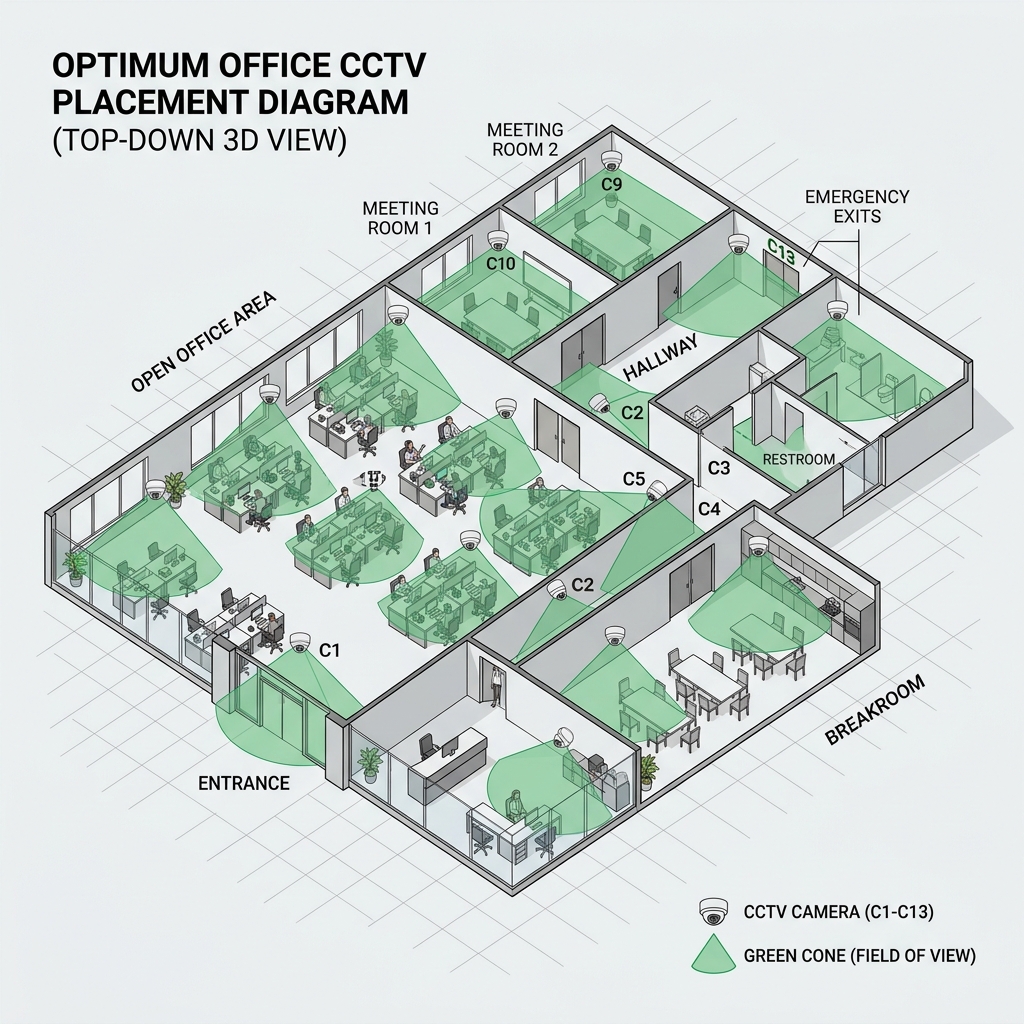
A 4K IP Camera is completely useless if it's pointing in the wrong direction. When a security incident occurs—whether it's an unauthorized intruder sneaking into the server room or a laptop going missing from a desk—the HR and IT teams will immediately review the footage. If the camera was installed too high, you will only see the top of the intruder's head. If it was pointed directly at a bright window, the intruder's face will be a completely black silhouette.
Designing a CCTV layout for a massive corporate office is not just about mounting cameras randomly in the corners of rooms. It requires a strategic understanding of geometry, lighting physics, and human behavior.
In this comprehensive 2000+ word masterclass by the security engineers at Anshuman Enterprises, we will explore the science of camera placement. We will break down the "Choke Point Strategy," explain the critical difference between 2.8mm and 4mm focal lengths, and show you how to eliminate dangerous blind spots once and for all.
Table of Contents
- ▸ 1. The Choke Point Strategy (Entrances and Exits)
- ▸ 2. Understanding Focal Lengths: 2.8mm vs 4mm Lenses
- ▸ 3. WDR (Wide Dynamic Range): Defeating the Silhouette Effect
- ▸ 4. Eliminating Blind Spots with Overlapping Fields
- ▸ 5. Protecting High-Value Assets: IT Server Rooms
- ▸ 6. Legal Privacy Considerations in Corporate Surveillance
- ▸ 7. Expert Frequently Asked Questions (FAQs)
1. The Choke Point Strategy (Entrances and Exits)
The foundation of any enterprise security design is the "Choke Point Strategy." A choke point is any location in the building where a human being must pass through to go from Point A to Point B. The main reception door, the basement elevator lobby, and the emergency fire stairwell are all prime choke points.
You do not need to blanket every square inch of your office with cameras if you have successfully locked down all the choke points. If an incident happens in the cafeteria (which may not have a camera), you can simply check the choke point cameras leading into the cafeteria to see exactly who entered during that timeframe.
⚠ The "Top of the Head" Mistake
A common amateur mistake is mounting the choke point camera directly above the door pointing straight down. All this captures is the top of the person's head or their cap. A choke point camera must be mounted 10 to 15 feet away from the door, pointing at the door at eye-level (or slightly above) to capture a clear, recognizable facial shot.
2. Understanding Focal Lengths: 2.8mm vs 4mm Lenses
When you buy a Dome or Bullet camera from Hikvision or CP Plus, the box will specify a focal length, usually 2.8mm, 3.6mm, or 4mm. This number determines the Field of View (FOV) of the camera.
- 2.8mm Lens (Wide Angle): This lens provides a massive 90° to 110° horizontal field of view. It is perfect for small rooms, elevators, and reception areas because one camera can see almost the entire room. However, because the image is stretched so wide, objects further than 15 feet away will look very small and facial recognition will be difficult.
- 4mm Lens (Narrow / Zoomed): This lens provides a narrower 70° to 80° field of view, but the objects in the image appear much closer. This is the absolute best lens for long, narrow office hallways and specific choke points where you need high facial detail from 25 feet away.
💡 Varifocal Lenses
If you are unsure of the exact distance, purchase a "Motorized Varifocal" camera (e.g., 2.8mm to 12mm). You can install the camera, log into the NVR software from your laptop, and physically zoom the lens in and out via software until the framing is perfect.
3. WDR (Wide Dynamic Range): Defeating the Silhouette Effect
Modern corporate offices feature massive floor-to-ceiling glass windows. If you point a standard camera towards a glass door during the daytime, the intense sunlight outside will overwhelm the camera's sensor. The camera will automatically darken the image to compensate, turning the person walking through the door into a completely black, unrecognizable silhouette.
To fix this, you must exclusively use cameras equipped with True WDR (Wide Dynamic Range - 120dB).
WDR works by taking two separate photos simultaneously: one photo at a very fast shutter speed (to capture the bright background) and one photo at a slow shutter speed (to capture the dark subject). The camera's internal processor instantly merges these two photos together, creating a perfectly balanced image where both the bright window and the person's face are clearly visible.
4. Eliminating Blind Spots with Overlapping Fields
A smart intruder (or a rogue employee) will look for the camera and deliberately walk directly underneath it, knowing that a camera cannot record what is directly below its own housing. This is known as a blind spot.
✅ Cross-Coverage Layout
The professional solution is "Cross-Coverage." In a large open-plan cubicle space, you should install two cameras at opposite ends of the room pointing towards each other. Camera A records the people walking away from Camera B, and Camera B records the people walking directly underneath Camera A. This guarantees 100% overlapping coverage with zero blind spots.
5. Protecting High-Value Assets: IT Server Rooms
The IT Server Room contains the company's most valuable asset: its data. This room requires a drastically different approach to CCTV placement.
- The Anti-Tailgating Camera: This camera is placed inside the server room, pointing directly at the door. If an authorized IT admin swipes their card and opens the door, this camera verifies if an unauthorized person snuck in behind them (tailgating) before the door closed.
- Rack-Level Cameras: Instead of wide-angle ceiling cameras, narrow 4mm bullet cameras should be mounted looking directly down the server rack aisles. If a server is unplugged, you need to see exactly which rack was tampered with.
Need enterprise-grade surveillance for your office? We supply authentic Hikvision, CP Plus, and Dahua IP cameras. Explore our security catalog at wholesale pricing.
6. Legal Privacy Considerations in Corporate Surveillance
While security is paramount, placing cameras incorrectly can lead to severe legal liabilities and HR nightmares. Under Indian privacy laws, employees still have a reasonable expectation of privacy in certain areas of the workplace.
Where NOT to Place Cameras:
- Restrooms and Changing Rooms: Absolutely prohibited. This is a severe criminal offense under the IT Act.
- Employee Break Rooms: While legally permissible if disclosed, pointing cameras directly at lunch tables damages employee morale. It is better to place cameras at the entrances to the break room instead.
- Directly Over Keyboards: You cannot place a high-zoom PTZ camera pointing directly over an employee's shoulder to read their screen or record them typing passwords. This is a severe violation of corporate data privacy.
7. Expert Frequently Asked Questions (FAQs)
Should I use Dome or Bullet cameras in an office? +
Dome cameras are highly recommended for indoor office environments. They are aesthetically pleasing, blend into false ceilings, and the smoked glass dome makes it very difficult for employees to see exactly which direction the lens is pointing.
At what height should an office camera be mounted? +
The ideal mounting height for indoor facial recognition is between 8 to 10 feet. If you mount it higher than 10 feet, the angle becomes too steep, and you will only record the tops of people's heads rather than their facial features.
Do office cameras record audio? +
Most modern IP cameras have built-in microphones. However, recording audio in a workplace without explicit written consent from employees can violate wiretapping and privacy laws. We highly recommend disabling the audio recording feature via the NVR software in open office spaces.
Get a Professional CCTV Layout Plan
Don't guess where your blind spots are. The security engineers at Anshuman Enterprises will create a complete CAD blueprint layout for your corporate office.
Book a Free Site Survey