 By Aditya Tiwari, Anshuman Enterprises
If you are looking for reliable CCTV installation services in Greater Noida, you already know that choosing the right surveillance setup is absolutely critical. In today's fast-paced corporate environment, office security goes far beyond simply purchasing a camera online and bolting it to a wall. True security requires strategic placement, industrial-grade wiring, dependable data storage solutions, and network infrastructure that protects your business against theft, liability, and unauthorized access.
Whether you are setting up a brand-new corporate IT park in Greater Noida West or upgrading an aging analog system in a bustling commercial plaza, making the wrong choice in your CCTV architecture can lead to massive security vulnerabilities, corrupted footage, and wasted capital.
In this massive, comprehensive 2000+ word guide, the technical experts at Anshuman Enterprises will walk you through every single detail you need to know about setting up a professional, tamper-proof CCTV system for your commercial space. We will cover everything from camera types and NVR bandwidth calculations to optimal placement strategies and legal considerations in India.
Table of Contents
- ▸ 1. Comprehensive Guide to CCTV Camera Types
- ▸ 2. Best Camera Placement Strategy for Maximum Coverage
- ▸ 3. DVR vs NVR: A Deep Dive Technical Comparison
- ▸ 4. Professional Cabling and Wiring Solutions
- ▸ 5. Storage Calculations and Network Bandwidth
- ▸ 6. Legal and Privacy Considerations in India
- ▸ 7. Preventative Maintenance and Troubleshooting
- ▸ 8. Expert Frequently Asked Questions (FAQs)
1. Comprehensive Guide to CCTV Camera Types
The foundation of any robust surveillance system begins with selecting the correct hardware. Not all cameras serve the same purpose. Applying a one-size-fits-all approach is the most common mistake made by inexperienced contractors. Here is a breakdown of the primary camera architectures used in modern commercial spaces:
Dome Cameras
Named for their dome-like shape, these cameras are the absolute standard for indoor office spaces, retail stores, and reception areas. Their primary advantage lies in their unobtrusive design. Because the camera lens is housed inside a tinted dome, it is extremely difficult for individuals to tell exactly which direction the camera is pointing, which inherently acts as a powerful psychological deterrent.
Bullet Cameras
Bullet cameras are highly visible, cylindrical cameras designed primarily for outdoor use, such as parking lots, building perimeters, and loading docks. Their prominent design is intentional—they are meant to be seen. Modern bullet cameras come equipped with long-range infrared (IR) illuminators, making them incredibly effective for pitch-black nighttime surveillance.
PTZ (Pan-Tilt-Zoom) Cameras
PTZ cameras are the heavy-duty workhorses of large-scale surveillance. They are commonly installed in massive warehouses, manufacturing plants, and large campus exteriors. A security operator can remotely pan the camera side-to-side, tilt it up and down, and use optical zoom to focus on a license plate or a person's face from hundreds of feet away without losing resolution.
Critical Camera Specifications to Check:
- Resolution: Do not settle for less than 2MP (1080p). For critical areas like cash registers or server rooms, opt for 4MP or 8MP (4K) cameras.
- IP Rating (Ingress Protection): Outdoor cameras must be rated at least IP66 or IP67 to withstand heavy monsoon rains and dust storms typical in the Delhi NCR region.
- WDR (Wide Dynamic Range): Essential for cameras facing glass doors or windows. WDR balances the extremely bright outdoor light with the darker indoor shadows so the subject isn't washed out.
- ColorVu / Full-Color Night Vision: Unlike traditional IR cameras that record in black-and-white at night, newer technologies from brands like Hikvision and CP Plus allow for full-color recording even in near-total darkness.
2. Best Camera Placement Strategy for Maximum Coverage
⚠ The Blind-Spot Problem
A staggering 40% of security systems fail to capture critical incident footage because cameras are either pointed at glaring light sources, blocked by opening doors, or positioned too high to capture facial details.
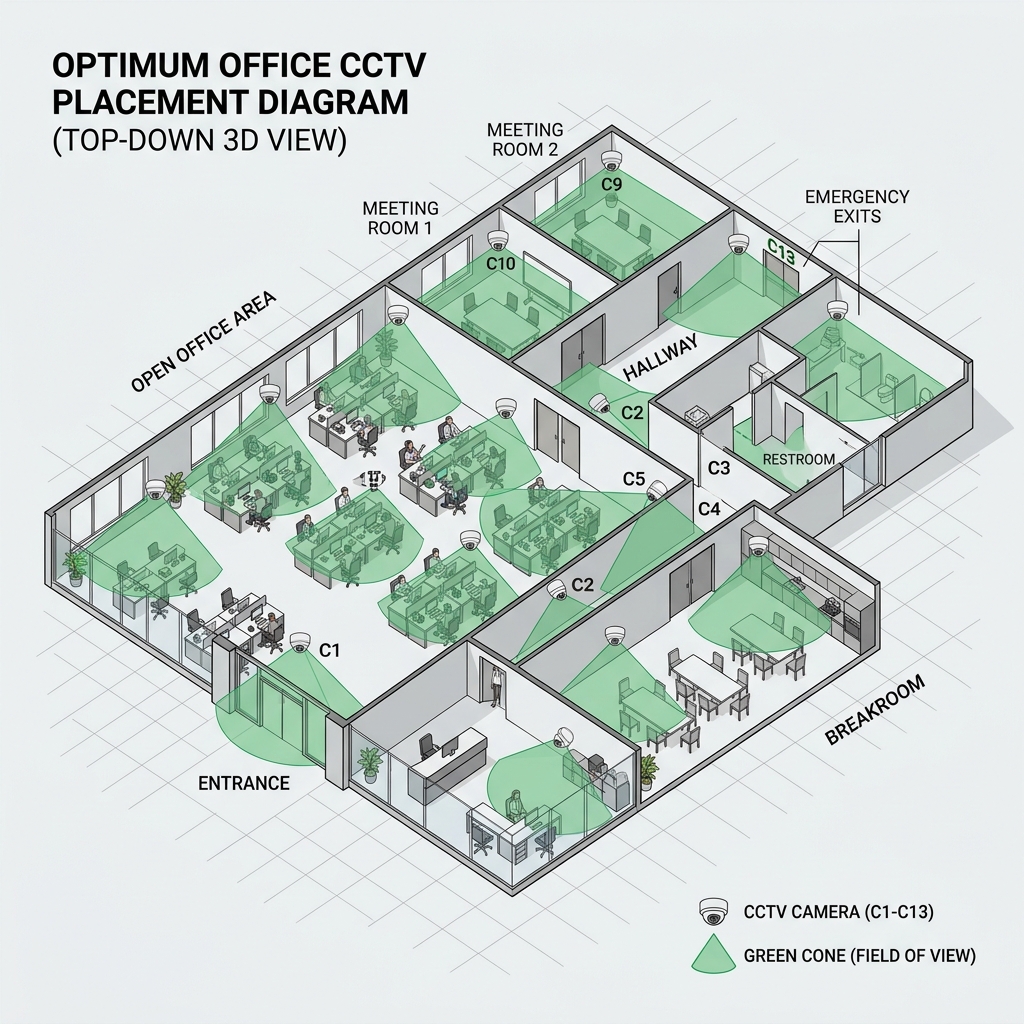
Strategic placement ensures maximum coverage with the absolute minimum number of cameras, reducing your overall hardware and cabling costs while improving security. Here is the blueprint for office camera placement:
Entry and Exit Points
Every single ingress and egress point must be covered. Cameras here should be mounted at a height of about 8 to 10 feet. If you mount them any higher, you will only capture the tops of people's heads. Use cameras with WDR technology here to counteract the bright light pouring in from outside.
Reception and Waiting Areas
This is high-traffic territory. A wide-angle Dome camera placed in the corner of the reception area usually provides comprehensive coverage. Ensure it has a clear view of the visitor logbook or the receptionist's desk.
Server Rooms and IT Infrastructure
Data is your company's most valuable asset. The server room should have a dedicated, high-resolution camera pointing directly at the rack doors. This camera should be integrated with motion-detection alerts that notify the IT manager via email or push notification if someone enters the room after hours.
✅ The Anshuman Enterprise Solution
Before drilling a single hole, our technicians create a "Cone of Vision" floor plan. We map out the exact field of view (measured in degrees) for every single camera on your architectural blueprint, ensuring that the blind spots of one camera are covered by the overlapping view of another.
3. DVR vs NVR: A Deep Dive Technical Comparison
The recording unit is the centralized brain of your entire CCTV system. The choice between a Digital Video Recorder (DVR) and a Network Video Recorder (NVR) dictates the type of cabling you will use, the cameras you can buy, and how future-proof your system will be.
DVR (Digital Video Recorder)
DVRs process video data at the recorder itself. They are used in conjunction with older Analog cameras. The cameras capture raw analog signals and transmit them via Coaxial cables to the DVR, which then digitizes and compresses the footage. While DVR systems are significantly cheaper upfront, they require bulky coaxial cables and a separate power cable for every single camera.
NVR (Network Video Recorder)
NVRs process video data directly at the camera. They are used exclusively with modern IP (Internet Protocol) cameras. The IP camera captures, digitizes, and compresses the video internally, then sends it over a standard Ethernet network (Cat6 cable) to the NVR.
For modern commercial offices, Anshuman Enterprises exclusively recommends NVR systems with IP cameras. Why? Because of PoE (Power over Ethernet). With an NVR system, a single Cat6 cable provides both data transmission and electrical power to the camera. This cuts installation time in half and drastically reduces cable clutter.
💡 Expert Tip: The Power of PoE Switches
If you have a large office spanning multiple floors, you do not need to run 50 cables all the way down to the ground floor NVR. You can place a Gigabit PoE Switch on each floor, connect the cameras to that switch, and run a single high-speed uplink cable from the switch to the central NVR. This is the secret to clean, scalable corporate security!
4. Professional Cabling and Wiring Solutions
The number one cause of CCTV failure isn't bad cameras—it's bad wiring. Rodents, moisture, electromagnetic interference (EMI), and cheap wire jackets are the enemies of a stable surveillance system.
Choosing the Right Cable
If you are installing an IP system, use Cat6 pure copper cables. Do not use CCA (Copper Clad Aluminum) cables. CCA cables are cheaper, but they cannot handle Power over Ethernet reliably over long distances, leading to cameras randomly rebooting or losing connection at night when the IR LEDs draw maximum power.
Conduit and Protection
Never leave cables exposed. In indoor environments with false ceilings, cables must be routed through flexible PVC pipes. In outdoor environments or industrial settings, use heavy-duty rigid PVC or galvanized iron (GI) conduits. Exposed cables are an open invitation to vandals to simply snip the wire and disable your security.
Looking for wholesale networking products, Cat6 cables, and PVC conduits for your installation? Explore our complete electrical supply solutions available at wholesale prices in Greater Noida.
5. Storage Calculations and Network Bandwidth
How many days of footage do you need to keep? In India, many corporate compliance policies and local law enforcement guidelines recommend retaining at least 30 days of high-definition footage.
Storage requirements depend on three massive variables:
- Resolution: A 4K camera uses 4 times more storage than a 1080p camera.
- Frame Rate (FPS): Recording at 30 FPS eats up massive storage. For standard office security, recording at 15 FPS provides perfectly smooth playback while cutting storage costs in half.
- Compression Codec: Always ensure your NVR supports H.265+ compression. Compared to the older H.264 standard, H.265+ can reduce bandwidth and storage requirements by up to 70% without losing visual quality.
For a standard 8-camera system (2MP) recording continuously for 30 days using H.265 compression, you will need a dedicated 4TB Surveillance-grade Hard Drive (like WD Purple or Seagate SkyHawk). Never use desktop PC hard drives in an NVR; they are not built to spin 24/7 and will crash prematurely.
6. Legal and Privacy Considerations in India
Installing CCTV in a workplace is not just a technical endeavor; it carries legal responsibilities. Employees and visitors have a fundamental right to privacy.
You must place visible signboards stating "You are under CCTV Surveillance" at all entrances. It is strictly illegal to install cameras in areas where there is an expectation of privacy, such as restrooms, changing rooms, or lactation rooms. Furthermore, access to the NVR and recorded footage must be restricted to authorized security personnel only to prevent data misuse.
7. Preventative Maintenance and Troubleshooting
A CCTV system is not "install and forget." Dust accumulation on camera lenses can ruin night vision because the IR light reflects off the dust particles back into the lens, causing a foggy white glare.
- Quarterly Cleaning: Wipe down dome covers and bullet lenses with a microfiber cloth and lens cleaner.
- Check the UPS: Ensure the UPS battery backup is holding charge. Test it by cutting the main power to the NVR once a month.
- Firmware Updates: Hackers constantly scan the internet for outdated IP cameras. Ensure your NVR and cameras are updated to the latest firmware to patch cybersecurity vulnerabilities.
8. Expert Frequently Asked Questions (FAQs)
Which CCTV camera brand is best for commercial use in India? +
Hikvision, CP Plus, and Dahua are the undisputed market leaders in India. They offer incredible reliability, excellent local warranty support, and robust mobile applications for remote viewing. For highly sensitive enterprise and government applications, brands like Bosch or Axis are preferred.
What is the maximum distance a Cat6 cable can run to an IP camera? +
The standard IEEE limit for a Cat6 ethernet run providing Power over Ethernet (PoE) is 100 meters (328 feet). If you need to go further, you must use PoE extenders or active fiber optic links.
How many cameras are realistically required for a 2000 sq ft office? +
Depending on the layout, you typically need 6 to 8 cameras. You need coverage for the main entrance, reception, common workstations, IT server room, pantry, and rear emergency exits.
Can I view my office cameras from my mobile phone while traveling? +
Absolutely. Modern NVRs connect to your office internet router. By downloading the manufacturer's secure app (like iVMS or gCMOB) and scanning a QR code on the NVR, you can stream live and playback footage from anywhere in the world.
Ready to Secure Your Office?
Don't leave your commercial security to chance. Get a professional site survey and installation quote from the experts at Anshuman Enterprises today.
Contact Our Experts Now